Submitting your Legal Business Information is required to successfully send insurance updates, payment requests, and other communications to your patients.
What happens if I don't update my Legal Business Information?
If you fail to include the required information, text messages will be marked as spam and blocked from reaching patients.
Verify Legal Business Information – 2 mins
STEP 1
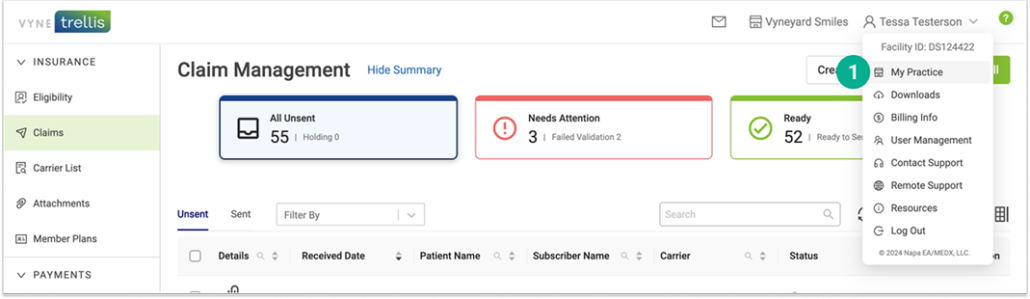
Open Vyne Trellis and click on your name in the upper right
1. In the upper right corner, select “My Practice”
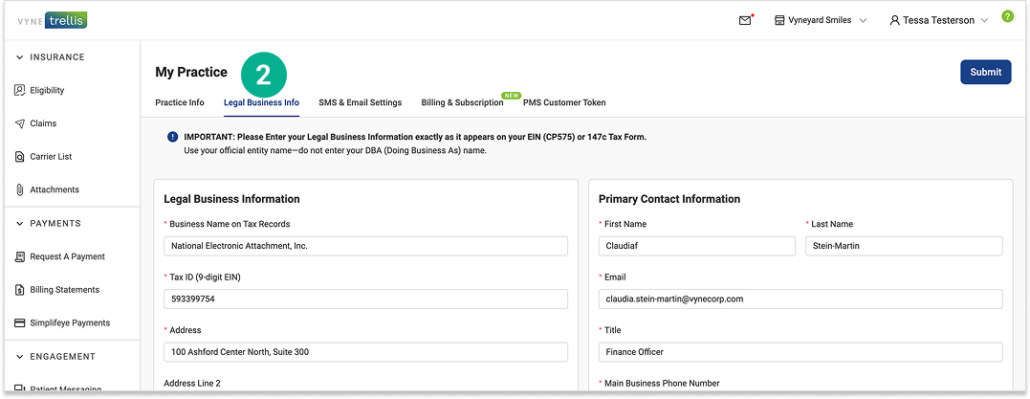
2. Select the “Legal Business Info” tab. Complete all required fields and click “Submit“.
Note: The legal business information you submit is used to verify your practice account and must exactly match the information on file with the IRS. If the information does not match, verification will fail and you will be prompted to try again. Each practice is allowed up to 3 verification attempts.
Practice Website is Required Every practice must have accurate website information on file to complete account verification. Using an incorrect or generic website can cause verification issues and may disrupt your services.
Please provide your practice website or a publicly accessible business profile URL (such as Facebook, Google, X, or Yelp).
If you provide a practice website, ensure it clearly displays your practice name, includes a privacy policy, and is accessible without requiring a login.